
1. Introduction
This document outlines the process for SMS Platform Owners to utilize the SMS.es APIs in order to retrieve billing and traffic data. The aim is to build XML document and seamlessly integrate it with their finance system. This integration can be achieved through a middleware service, with the flexibility for the Platform Owners to choose a third-party development company for building a middleware. A middleware service, after collecting data, generates an XML document and transfers it to the Platform Owner's ERP billing system via SFTP.
The SMS.es APIs provide two relevant endpoints for SMS Platform Owners to meet this specific requirement.
2. Flow Overview
The diagram illustrates the process of collecting data and creating the XML file.
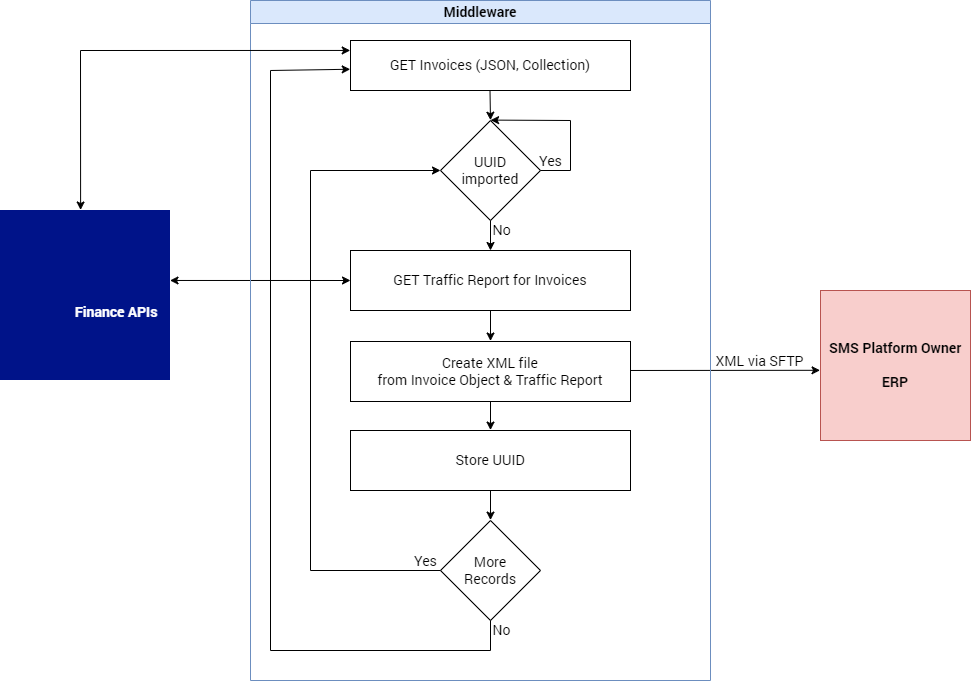
The steps are as follows:
-
The middleware gets an invoice collection every x days for a specific period of time by calling the Documents Export endpoint, described in SIT API / List of documents for export section.
-
The middleware iterates over the invoice collection and checks if the UUID (
bizPartnerExternalRefId- a foreign key to external independent Platform Owner's system DB) is already stored in the middleware's storage.
a. If false, go to Step 3.
b. If true, go to Step 7. -
The middleware gets relevant traffic report data for
invoiceId, by calling the Traffic Reports endpoint, described in Bulk Traffic Report API V3 / Get Postpaid Bulk Traffic Report. -
The middleware builds an XML file with the data gathered through steps 1-3.
-
The middleware transfers the file to the Platform Owner's ERP system via SFTP.
-
The middleware stores UUID (
bizPartnerExternalRefId) in the middleware's storage (checked in Step 2.). -
The middleware checks if there are more items in the invoice collection.
a. If true, go to Step 2.
b. If false, continue with Step 8. -
End of the process.
3. Authorization
The SMS.es APIs use the OAuth 2.0 protocol for authentication. For more information please refer to the OAuth2 Authentication Guidelines page.
As a Platform Owner, in order to have your app set up and running, you need to make the following steps.
3.1 Register Application and Obtain Credentials
To use any SMS.es SMS Platform APIs, you need to be authorized using the SMS.es.pro API. It is expected that your app will be a server-side implementation and as such will use the OAuth2 client credentials grant type.
In order to be able to use the APIs, you need to provide your app information for our support team: name and IP address(es) from which your app will access our APIs. In return, we will create an API account for your app and you will be given client_id and client_secret credentials.
Note: The client app is in charge for its own data after it's been given access to SMS.es APIs.
3.2 Get Access Token (Bearer)
In order to be able to call any API endpoint, you need to obtain a valid access token. Each access token has an expiration time, so you need to obtain a new one if the existing one is expired.
Here's a cURL call example of how an access token can be obtained (please replace CLIENT_ID and CLIENT_SECRET with the ones you were given in the previous step):
curl https://accounts-cpaas.sms.es/oauth2/access-token -d 'grant_type=client_credentials&client_id=CLIENT_ID&client_secret=CLIENT_SECRET'If the parameters are valid, and the call is made from the authorized IP address, the server will respond with JSON containing the access token:
{"access_token":"ACCESS_TOKEN", "token_type":"Bearer", "expires_in":604800}4. Sample of APIs Endpoints Usage
The following examples show the API calls for collecting data.
1. A call to API Document (Invoice) Export endpoint to get all invoices with payment status 'open', from June 2023:
curl -X GET --header "Accept: application/json" --header "Authorization: Bearer ACCESS_TOKEN" --header "Content-Type: application/json" "https://api-cpaas.sms.es/finance/sit/v1/documents-export?paymentStatus=open&between(documentDate)=2023-06-01,2023-06-30"2. A call to API Traffic Reports endpoint to get a list of traffic reports for a given customer INVOICE_ID:
curl -X GET --header "Accept: application/json" --header "Authorization: Bearer ACCESS_TOKEN" --header "Content-Type: application/json" "https://api-cpaas.sms.es/bulk-traffic-report/v2/customer-invoices/INVOICE_ID/traffic-reports"