
v4.1.0
1. Introduction #
HTTP Bulk Service API enables customers to send SMS over HTTP/HTTPS and to receive Delivery Reports (DLRs) over the same protocol.
1.1 Help with Formatting Special Types of Messages #
SMS.ES HTTP Bulk Service API helps customers to format special types of messages, such as concatenated messages and WSI (WAP Service Indication) messages. HTTP Bulk Service API may split the submitted message into several physical SMS messages (concatenated messages) or reject the message because it is too long. Customer balance is charged per physical SMS, as in details described in the following text.
1.2 Integration #
Integration libraries are available on the following links:
PHP: https://github.com/horisen/smsgate-smshttpclient-php
JavaScript: https://github.com/horisen/smsgate-smshttpclient-node
Go: https://github.com/horisen/smsgate-smshttpclient-golang
2. Protocol Description #
This chapter provides information about the supported types of bulk SMS messages and the data flow of the messages and delivery reports.
It also provides information on the types of cases for the delivery status of the messages.
2.1 Types of Bulk Messages #
Customers can send different types of messages:
- GSM Text messages
- Unicode Text Messages
- WAP Service Indicators (WSI)
2.2 Data Flow of Message and Delivery Reports #
The message is submitted over HTTP/HTTPS from the customer to SMS.ES HTTP Bulk Service API. When API has information on what happened with the delivery of the message (described in 2.5.3 Delivery Report Events section), it will send (also using HTTP/HTTPS) an event to the Callback DLR URL provided by the customer.
There are four cases:
- Delivered message (DELIVERED)
- Undelivered message (UNDELIVERED)
- Rejected message (REJECTED)
- Buffered (temporary undelivered) message (BUFFERED) followed by final DLR event, delivered (DELIVERED), undelivered (UNDELIVERED) or rejected (REJECTED)
When the message cannot be delivered as fast as possible due to temporary problems and if the DLR mask allows sending buffered events to customers for each delivery attempt, DLR event Buffered will be sent to the Callback DLR URL, as described in 2.2.4 Buffered (Temporary Undelivered Message) section.
If the DLR mask does not allow sending DLR event Buffered to the customer, no notification will be provided until the final event, Delivered or Undelivered. When the message is delivered (at first attempt or at any latter attempt), DLR event Delivered will be sent, as described in 2.2.1 Delivered Message section.
When the Bulk Service decides that a message cannot be delivered (at first attempt or at any latter attempt or when message validity expires), a DLR event Undelivered will be sent, as described in 2.2.2 Undelivered Message section.
When the message is rejected immediately on submission, the customer will be informed with HTTP response about the reason, as described in 2.2.3 Rejected Message section. Rejection may also happen later, and the customer will be informed using DLR event Rejected.
The following sections explain these cases more in detail.
2.2.1 Delivered Message #
When a customer submits an SMS to SMS.ES Bulk System, the message will be delivered to its destination as fast as possible. When SMS.ES Bulk System receives confirmation from a destination that the message is delivered, it will send a DLR Event Delivered to Callback DLR URL.
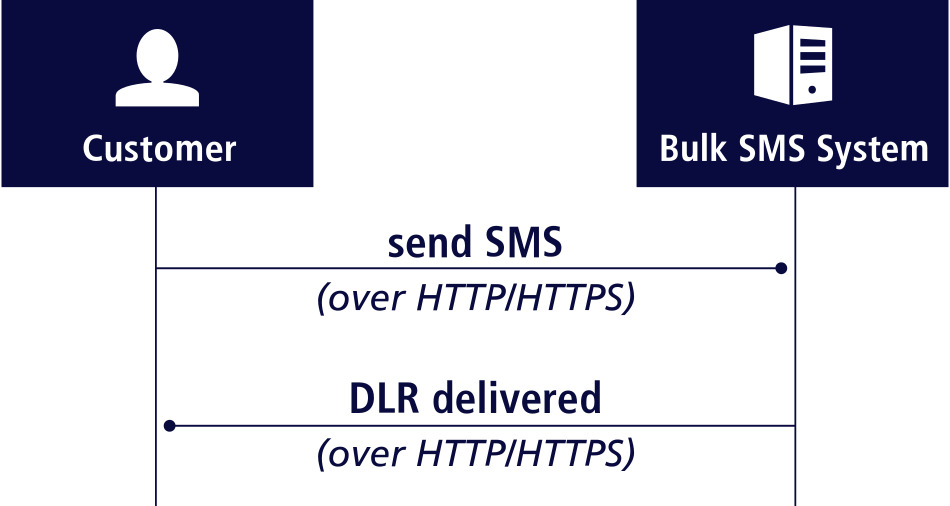
Figure: Data flow for delivered message
2.2.2 Undelivered Message #
This case is similar to Delivered Message except it describes a failure in delivery. Callback DLR URL will be called with DLR event Undelivered and a reason. No further attempt to deliver will be made. Messages are undelivered in cases when:
- The destination number does not represent an existing mobile phone.
- There is no route to the required destination.
- If SMS.ES Bulk System was not able to deliver the message to the phone during the validity period (which is by default 24 hours).
- In case of some other permanent error that makes a delivery to mobile phone impossible.
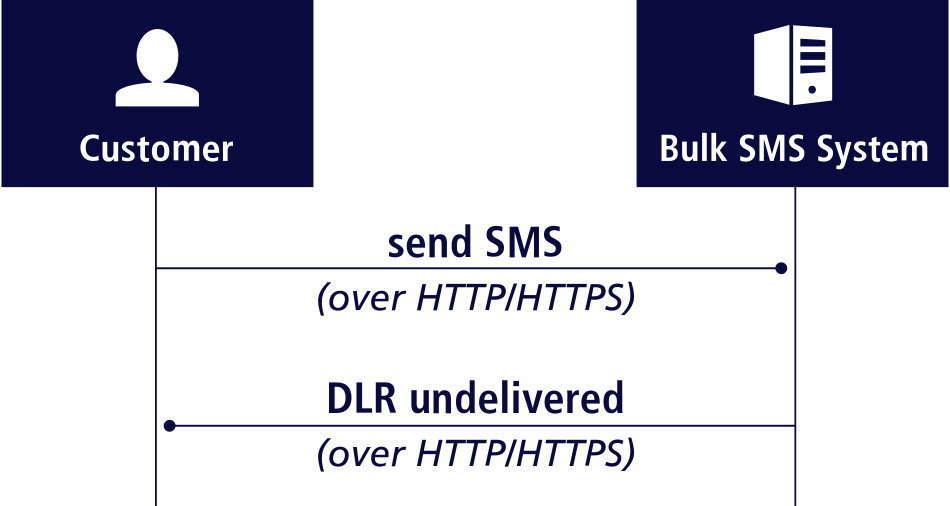
Figure: Data flow for undelivered message
2.2.3 Rejected Message #
Messages can be rejected by SMS.ES Bulk System in several cases:
- When the username and/or password submitted in the request don’t match the one configured for the account.
- When the account is disabled.
- When there is no money on the account balance.
- When the destination is not allowed for the customer.
- When the sender field contains not allowed characters.
- When the format of any parameter is not correct.
- When the contents of some parameter (for example parameter text for text message submission) contains characters not supported with selected data coding.
- Rejection can happen:
- immediately on submission, in which case the error will be returned to the customer with HTTP/HTTPS response on the submission request.
- or it can happen later, in which case the Callback DLR URL will be called with the DLR event Rejected.
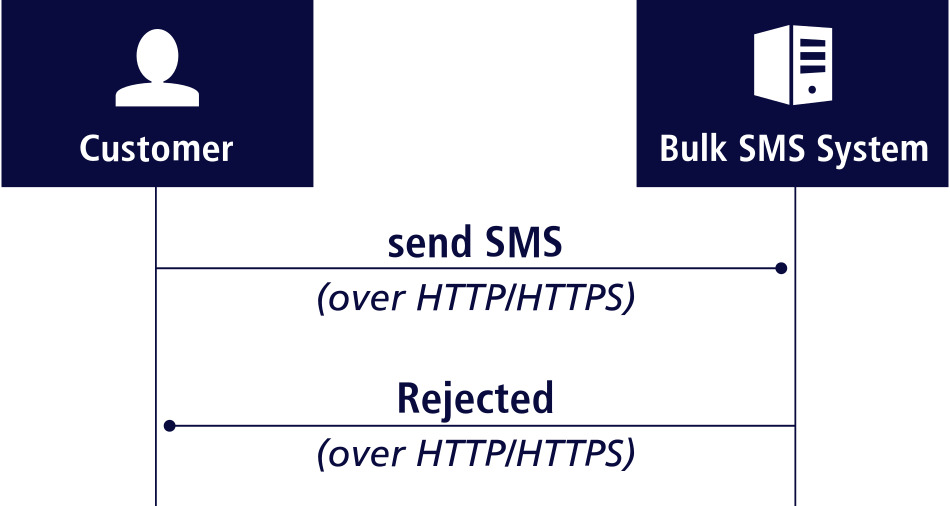
Figure: Data flow for rejected message
Data flow for the message that is rejected later, after successful submission:
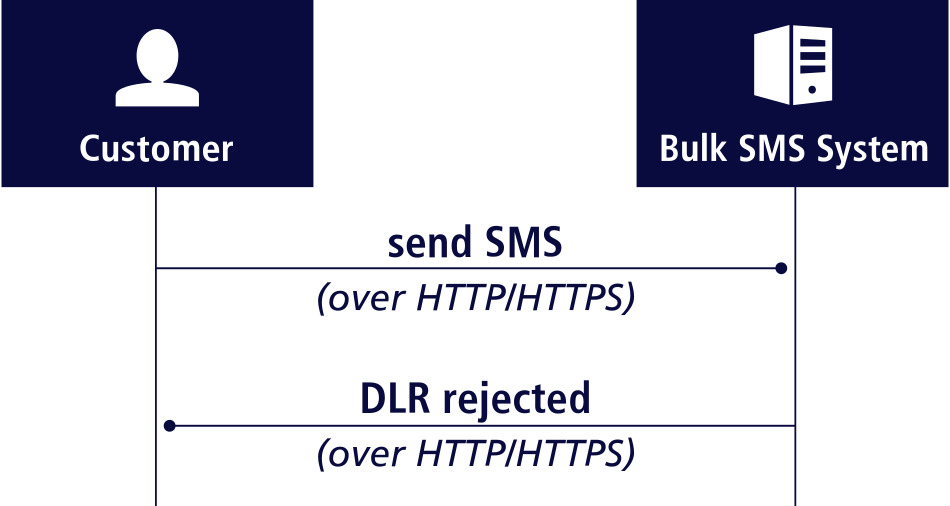
Figure: Data flow for message that is rejected later, after successful submission.
2.2.4 Buffered (Temporary Undelivered) Message #
If SMS.ES HTTP Bulk Service cannot deliver the message at the first attempt, and the DLR mask allows sending of buffered messages to the customer, DLR will be sent to the customer for each attempt with the reason of temporary failed delivery.
Reasons for temporary failures can be:
- Absent subscriber (subscriber is not within reach of destination network or his phone is offline).
- The mobile phone buffer for SMS is full.
- Any other temporary failures of mobile device or destination mobile network when there is a chance to be resolved within the message validity period.
SMS.ES Bulk System will stop trying to deliver the message in the following situations:
- The message is successfully delivered, in which case the DLR event Delivered is sent.
- A permanent error happened which makes delivery impossible (e.g. the destination number does not exist). DLR event Undelivered or Rejected is sent.
- Message validity period expired – within the validity period, SMS.ES Bulk System was not able to deliver the message to the mobile phone. DLR event Undelivered or Rejected is sent.
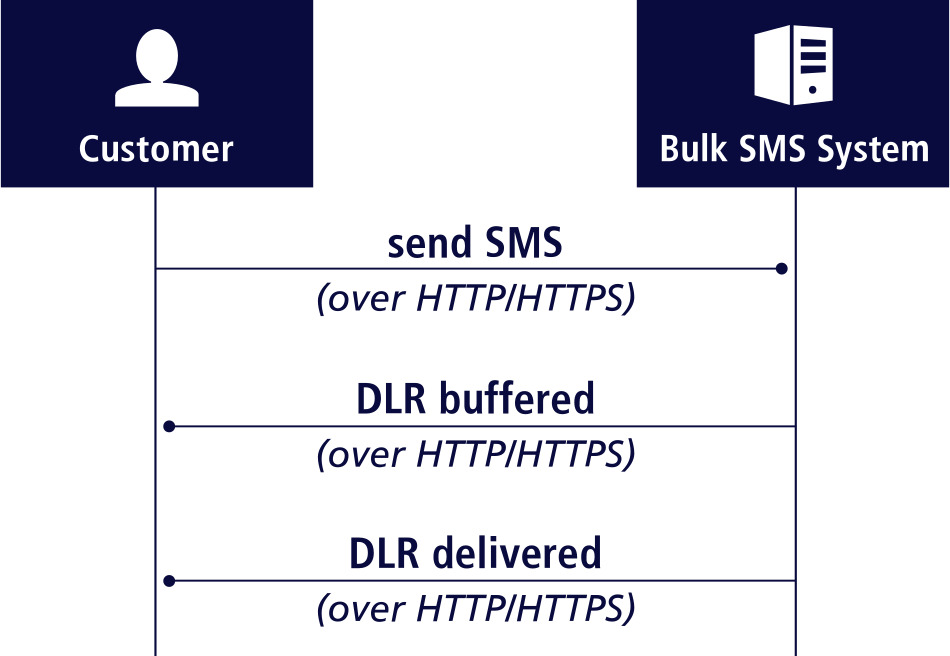
Figure: Data flow for buffered (temporary undelivered message)
2.3 Sending SMS #
Messages are sent using POST HTTP Method, to the URLs provided together with the credentials.
HTTP Post JSON payload must be encoded using UTF-8 encoding.
2.3.1 JSON Fields in Submitted Message #
JSON fields in submitted message, common for all types:
| Name | Type | Description |
|---|---|---|
| type | string | Type of a message. It can be: text or wsi.For type=’text’: – text – UTF-8 encoded text of message content, – dcs – message coding, gsm (for GSM messages) or ucs (for Unicode messages).For type=’wsi’: – url – URL to show in WSI, – title – Title of WSI. |
| sender | string | SMS originator address, alphanumeric or numeric. |
| receiver | string | SMS destination address, numeric. Recipient phone number in international format (E.164) without the leading plus sign (+). Example: "receiver": "4179123456". |
| dlrMask | integer | DLR mask represents DLRs customer wants to receive, described in the following text (optional, default=19). |
| dlrUrl | string | DLR URL where to send DLR callbacks (optional, if not present, the one set in an account settings in the platform is used). |
| flash | boolean | Is the SMS “flash”? A flash SMS is a message that appears directly on a mobile screen for immediate viewing and then disappears, without being stored in the inbox. |
| validityPeriodMinutes | integer | SMS validity period, which is the duration in minutes that delivery will be attempted. |
| custom | object | Custom JSON object that will be sent back as a part of each DLR (optional, default empty). |
| auth | object | Authentication object with two fields:username – account usernamepassword – account password. |
2.3.2 Example of Submission URLs #
- For HTTP:
http://sms.example.org/bulk/sendsms - For HTTPS:
https://sms.example.org/bulk/sendsms
NOTE: Instead of ‘sms.example.org’ please use URLs provided to you in Excel file with your account data.
2.3.3 Text Messages in GSM Encoding #
SMS to be sent is encoded in JSON document:
{
    "type": "text",
    "auth": {"username": "testuser", "password": "testpassword"},
    "sender": "BulkTest",
    "receiver": "4179123456",
    "dcs": "GSM",
    "text": "This is test message",
    "dlrMask": 19,
    "dlrUrl": "http://my-server.com/dlrjson.php"
}
and it must be submitted to the URL (HTTP or HTTPS) that is given together with the credentials.
2.3.4 Examples (From Bash Shell) #
For HTTP:
CONTENT='{
    "type": "text",
    "auth": {"username": "testuser", "password": "testpassword"},
    "sender": "BulkTest",
    "receiver": "41787078880",
    "dcs": "GSM",
    "text": "This is test message",
    "dlrMask": 19,
    "dlrUrl": "http://my-server.com/dlrjson.php"
}'

curl -L "http://sms.example.org/bulk/sendsms" -XPOST -d "$CONTENT"
For HTTPS:
CONTENT='{
    "type": "text",
    "auth": {"username": "testuser", "password": "testpassword"},
    "sender": "BulkTest",
    "receiver": "41787078880",
    "dcs": "GSM",
    "text": "This is test message",
    "dlrMask": 19,
    "dlrUrl": "http://my-server.com/dlrjson.php"
}'

curl -L "https://sms.example.org/bulk/sendsms" -XPOST -d "$CONTENT"NOTE: Instead of ‘sms.example.org’ please use URLs provided to you in Excel file with your account data.
2.3.5 Unicode Messages #
{
    "type": "text",
    "auth": {"username": "testuser", "password": "testpassword"},
    "sender": "BulkTest",
    "receiver": "4179123456",
    "dcs": "UCS",
    "text": "This is test message with some UTF-8 characters üöä€ ",
    "dlrMask": 19,
    "dlrUrl": "http://my-server.com/dlrjson.php"
}
Message text must be UTF-8 encoded as well, but it will be sent to the destination device encoded using UTF-16 protocol. Content is converted by Bulk Service.
Note that GSM messages, when long, need to be encoded to 140 bytes or 160 septets when content is converted to GSM encoding. Available number of bytes is further reduced by the length of the UDH (used for concatenation). Unicode messages use the same number of bytes (140) but require more bytes for each character (UTF-16 encoding). This means, when message content is longer, and must be sent as concatenated parts, Unicode messages will require more parts than GSM messages.
2.3.6 WAP Server Indication (WSI) Messages #
{
    "type": "wsi",
    "auth": {"username": "6666_TESTHTTP", "password": "TerWAvAs"},
    "sender": "BulkTest",
    "receiver": "41787078880",
    "url": "https://www.sms.es/",
    "title": "SMS.ES",
    "dlrMask": 19,
    "dlrUrl": "http://my-server.com/dlrjson.php"
}
2.3.7 HTTP Response When Sending SMS #
If the message is accepted to be sent, HTTP status code is 202 and JSON response is:
{
    "msgId": "9325d0a8-2638-11e6-afe7-bffc7cc8fa4f",
    "numParts": 2
}
Where:
- msgId – message ID formatted as UUID and used for referencing further this message, for example in DLR.
- numParts – number of parts if the message is concatenated. If the message can be sent as one SMS part (without concatenation), numParts will be 1.
If the message is rejected, the HTTP status code is 420 and the response is:
{
    "error": {
        "code": "107",
        "message": "Invalid sender"
    }
}
API may also return other error codes from the 5xx range. In this case, there is no JSON response and error codes conform to standard HTTP error codes.
2.4 Error Codes #
Error codes are listed in the following table:
| Error code | Value | Description |
|---|---|---|
| RC_APPLICATION_ERROR | 101 | Internal application error. |
| RC_ENCODING_ERROR | 102 | Encoding not supported or message not encoded with selected encoding. |
| RC_NO_ACCOUNT | 103 | No account with given username/password. |
| RC_IP_NOT_ALLOWED | 104 | Sending from clients IP address not allowed. |
| RC_THROTTLING_ERROR | 105 | Too many messages were submitted within a short period of time. Resend later. |
| RC_BLACKLISTED_SENDER | 106 | Sender contains words blacklisted on destination. |
| RC_INVALID_SENDER | 107 | Sender contains illegal characters. |
| RC_MESSAGE_TOO_LONG | 108 | The message is too long. |
| RC_BAD_CONTENT_FORMAT | 109 | The format of the text parameter is wrong. |
| RC_MISSING_MANDATORY_PARAMETER | 110 | Mandatory parameter is missing. |
| RC_UNKNOWN_MESSAGE_TYPE | 111 | Unknown message type. |
| RC_BAD_PARAMETER_VALUE | 112 | Format of some parameter is wrong. |
| RC_NO_CREDIT | 113 | No credit on account balance. |
| RC_NO_ROUTE | 114 | No route for given destination. |
| RC_CONCAT_ERROR | 115 | Message cannot be split into concatenated messages (e.g. too many parts will be needed). |
| RC_LOOP_DETECTED | 116 | Loop detected. |
2.4.1 How to Handle Errors #
When the customer receives an HTTP status code 420 METHOD_INVOCATION_FAILURE, he should not retry the submission of the message, except in the case of RC_THROTTLING_ERROR.
2.4.1.1 Throttling Error #
In case when submission fails with RC_THROTTLING_ERROR, the customer should wait one second and then retry the submission.
2.4.1.2 Internal server Error #
In case when submission fails with HTTP status code 500 INTERNAL_SERVER_ERROR, the customer should wait at least one minute and then retry the submission.
2.5 Receiving DLR #
Delivery reports are sent to the customer to the URL provided in JSON field “dlrUrl” when submitting an SMS. Alternatively, the account could be set up with a default value for “dlrUrl”.
It is JSON encoded, with the following form:
{
    "msgId": "9325d0a8-2638-11e6-afe7-bffc7cc8fa4f",
    "event": "DELIVERED",
    "errorCode": 0,
    "errorMessage": "",
    "partNum": 0,
    "numParts": 1,
    "accountName": "testuser",
    "sendTime": 0,
    "dlrTime": 2
}
The previous JSON is an example of DLR for a message that is not concatenated (numParts=1), then partNum is 0.
Fields in DLR:
| Name | Type | Description |
|---|---|---|
| msgId | string | ID of the message, the one returned when SMS is submitted. |
| event | string | One of DELIVERED, UNDELIVERED, REJECTED, BUFFERED, SENT_TO_SMSC. |
| errorCode | integer | Error code, a reason for delivery failure (check DLR error code list in the next section). Zero represents no error. |
| errorMessage | string | A message associated with errorCode. |
| numParts | integer | Total number of concatenated parts. If message is not concatenated then numParts=1. |
| partNum | integer | A number of a message part. It can be from [0..numParts-1] interval.Example:If message is not concatenated, then numParts=1. Then partNum=0.If message is concatenated of two parts i.e. numParts=2, then partNum is one from [0, 1] interval. |
| sendTime | integer | Seconds passed from SMS submission until Bulk Service successfully sent SMS to the route (next hop). |
| dlrTime | integer | Seconds passed from SMS being sent to the route (next hop) until the delivery report was received. |
Depending on an account settings, DLR may contain additional fields:
- mcc – Mobile Country Code discovered for the destination number.
- mnc – Mobile Network Code discovered for the destination number.
- country – ISO2 code of the country where the destination number is registered.
- price – The price of the SMS (this information is informal and may be subject to change).
- currency – The currency of the price.
If SMS is submitted with “custom” field, DLR will have:
- custom – The same object sent back in each DLR.
When a message is concatenated, it is submitted by the customer as one submission, and then split by Bulk Service to required number of SMS parts. DLRs are sent to the Callback URL for each SMS part independently.
2.5.1 Example of DLRs for a Concatenated Message #
- An example of DLR for the first part of a concatenated message of two parts, i.e. numParts=2, then partNum=0:
{ "msgId": "9325d0a8-2638-11e6-afe7-bffc7cc8fa5e", "event": "DELIVERED", "errorCode": 0, "errorMessage": "", "partNum": 0, "numParts": 2, "accountName": "testuser", "sendTime": 0, "dlrTime": 2 } - An example of DLR for the second part of a concatenated message of two parts, i.e. numParts=2, then partNum=1:
{ "msgId": "9325d0a8-2638-11e6-afe7-bffc7cc8fa6g", "event": "DELIVERED", "errorCode": 0, "errorMessage": "", "partNum": 1, "numParts": 2, "accountName": "testuser", "sendTime": 0, "dlrTime": 2 }
2.5.2 DLR Error Codes #
DLR Error Codes may vary across different platforms, influenced by factors such as error code mapping and other considerations.
DLR error codes are given in the following table:
| Value (dec) | Description |
|---|---|
| 0 | No error. |
| 1 | Unknown subscriber. |
| 9 | Illegal subscriber. |
| 11 | Teleservice not provisioned. |
| 13 | Call barred. |
| 15 | CUG reject. |
| 19 | No SMS support in MS. |
| 20 | Error in MS. |
| 21 | Facility not supported. |
| 22 | Memory capacity exceeded. |
| 29 | Absent subscriber. |
| 30 | MS busy for MT SMS. |
| 36 | Network/Protocol failure. |
| 44 | Illegal equipment. |
| 60 | No paging response. |
| 61 | GMSC congestion. |
| 63 | HLR timeout. |
| 64 | MSC/SGSN timeout. |
| 70 | SMRSE/TCP error. |
| 72 | MT congestion. |
| 75 | GPRS suspended. |
| 80 | No paging response via MSC. |
| 81 | IMSI detached. |
| 82 | Roaming restriction. |
| 83 | Deregistered in HLR for GSM. |
| 84 | Purged for GSM. |
| 85 | No paging response via SGSN. |
| 86 | GPRS detached. |
| 87 | Deregistered in HLR for GPRS. |
| 88 | The MS purged for GPRS. |
| 89 | Unidentified subscriber via MSC. |
| 90 | Unidentified subscriber via SGSN. |
| 112 | Originator missing credit on prepaid account. |
| 113 | Destination missing credit on prepaid account. |
| 114 | Error in prepaid system. |
| 500 | Other error. |
| 989 | Supplier rejected SMS. |
| 990 | HLR failure. |
| 991 | Rejected by message text filter. |
| 992 | Ported numbers not supported on destination. |
| 993 | Blacklisted sender. |
| 994 | No credit. |
| 995 | Undeliverable. |
| 996 | Validity expired. |
| 997 | Blacklisted receiver. |
| 998 | No route. |
| 999 | Repeated submission (possible looping). |
Delivery error codes are very often unreliable because of a lack of standards in messaging protocols. Bulk Service tries to provide the best effort to unify error code values. Error codes returned by underlying routes are mapped to the above table.
2.5.3 Delivery Report Events #
Delivery events that SMS.ES Bulk Service sends to the Callback are:
| Name | DLR mask value | Description |
|---|---|---|
| DELIVERED | 1 | Delivered to phone, final status. |
| UNDELIVERED | 2 | Non-Delivered to Phone, final status. |
| BUFFERED | 4 | Queued on SMSC, temporary status. |
| SENT_TO_SMSC | 8 | Delivered to SMSC, temporary status. |
| REJECTED | 16 | Non-Delivered to SMSC, final status. |
Statuses described with ‘final status’ are final delivery reports – no further delivery reports will be sent for the message. Statuses described with ‘temporary status’ are of two kinds:
- Queued on SMSC usually means that there was some problem delivering the message to the mobile phone, and further DLRs will follow.
- Queued on SMSC means that SMS.ES Bulk Service sent the message to the destination network.
DLR Mask set for each sent message can be a combination of these values. For example, 1+2+16=19 means that all the final statuses will be reported (DELIVERED, UNDELIVERED, REJECTED). DLR Mask 19 is recommended.
Temporary statuses are not always available, and it may depend on various criteria when they can be sent.
3. Additional Tables #
3.1 GSM Character Set #
| Dec | 0 | 16 | 32 | 48 | 64 | 80 | 96 | 112 | |
|---|---|---|---|---|---|---|---|---|---|
| Hex | 0 | 10 | 20 | 30 | 40 | 50 | 60 | 70 | |
| 0 | 0 | @ | Δ | SP | 0 | ¡ | P | p | |
| 1 | 1 | £ | _ | ! | 1 | A | Q | a | q |
| 2 | 2 | $ | Φ | “ | 2 | B | R | b | r |
| 3 | 3 | ¥ | Γ | # | 3 | C | S | c | s |
| 4 | 4 | è | Λ | ¤ | 4 | D | T | d | t |
| 5 | 5 | é | Ω | % | 5 | E | U | e | u |
| 6 | 6 | ù | Π | & | 6 | F | V | f | v |
| 7 | 7 | ì | Ψ | ‘ | 7 | G | W | g | w |
| 8 | 8 | ò | Σ | ( | 8 | H | X | h | x |
| 9 | 9 | Ç | Θ | ) | 9 | I | Y | i | y |
| 10 | A | LF | Ξ | * | : | J | Z | j | z |
| 11 | B | Ø | <ESC> | + | ; | K | Ä | k | ä |
| 12 | C | ø | Æ | , | < | L | Ö | l | ö |
| 13 | D | CR | æ | – | = | M | Ñ | m | ñ |
| 14 | E | Å | . | > | N | Ü | n | ü | |
| 15 | F | å | É | / | ? | O | § | o | à |
Additional characters on GSM phones (in conversion to GSM character set counted as two characters):
| You want to send ASCII | Send the following | ||||
|---|---|---|---|---|---|
| Character | Decimal | Hex | Characters | Hex | Decimal |
| € | <ESC> e | 1B 65 | 27 101 | ||
| <FF> | 10 | 0C | <ESC> <LF> | 1B 0A | 27 10 |
| [ | 91 | 5B | <ESC> < | 1B 3C | 27 60 |
| \ | 92 | 5C | <ESC> / | 1B 2F | 27 47 |
| ] | 93 | 5D | <ESC> > | 1B 3E | 27 62 |
| ^ | 94 | 5E | <ESC> ^ | 1B 14 | 27 20 |
| { | 123 | 7B | <ESC> ( | 1B 28 | 27 40 |
| | | 124 | 7C | <ESC> @ | 1B 40 | 27 64 |
| } | 125 | 7A | <ESC> ) | 1B 29 | 27 41 |
| ~ | 126 | 7E | <ESC> = | 1B 3D | 27 61 |
3.2 Supported Characters in Alphanumeric Sender #
When the SMS sender is alphanumeric, it can contain characters in the printable ASCII set, but depending on the destination being used some characters may not work.
The following tables give recommendations on which characters are typically supported.
3.2.1 Special Characters #
| Supported | Not Supported | ||
|---|---|---|---|
| Character | ASCII Code | Character | ASCII Code |
| SPACE | 0×20 | $ | 0×24 |
| ! | 0×21 | @ | 0×40 |
| “ | 0×22 | [ | 0x5B |
| # | 0×23 | \ | 0x5C |
| % | 0×25 | ] | 0x5D |
| & | 0×26 | ^ | 0x5E |
| ‘ | 0×27 | _ | 0x5F |
| ( | 0×28 | ` | 0×60 |
| ) | 0×29 | { | 0x7B |
| * | 0x2A | | | 0x7C |
| + | 0x2B | } | 0x7D |
| , | 0x2C | ~ | 0x7E |
| – | 0x2D | € | |
| . | 0x2E | ||
| / | 0x2F | ||
| : | 0x3A | ||
| ; | 0x3B | ||
| < | 0x3C | ||
| = | 0x3D | ||
| > | 0x3E | ||
| ? | 0x3F |
3.2.2 Supported Letters and Digits #
- 0123456789
- abcdefghijklmnopqrstuvwxyz
- ABCDEFGHIJKLMNOPQRSTUVWXYZ


